
Download EZ 7z – Free Mac Compression Tool, Secure 7z Archiver
Overview of EZ 7z
EZ 7z is a lightweight, free utility designed specifically for macOS users who need a reliable way to compress and decompress files in the popular 7z format. First released in 2011, the application has remained a solid choice for everyday users in the United States, China, and beyond. Its modest footprint means it won’t crowd your hard drive, yet it still packs enough power to handle large archives without compromising speed.
The current version, 0.54, was last updated on August 8 2011, and despite its age, the program continues to receive positive feedback for its simplicity and stability. EZ 7z belongs to the Utilities category, under the Compression sub‑category, and is offered exclusively in English. Whether you are a student needing to zip homework assignments, a professional compressing project deliverables, or simply a casual user who wants a quick way to extract 7z files, EZ 7z provides a secure, no‑frills experience that aligns with macOS’s native look and feel.
Key Features and What Sets EZ 7z Apart
- Native support for 7z, ZIP, TAR, GZIP, BZIP2 and other common archive formats.
- Drag‑and‑drop interface that integrates smoothly with Finder.
- Batch compression and extraction, allowing multiple files to be processed at once.
- Secure encryption using AES‑256 for password‑protected archives.
- Minimal system resource usage – the app runs efficiently on older Mac hardware.
- Automatic file association so double‑clicking a 7z file opens EZ 7z instantly.
- Simple preference panel for setting default compression levels and split‑size options.
While many macOS compression tools focus on a wide‑range feature set, EZ 7z concentrates on doing one thing exceptionally well: handling 7z files. Its straightforward UI eliminates the learning curve often associated with more complex archivers. The encryption feature, though optional, provides an extra layer of security for sensitive documents, making the tool suitable for both personal and professional contexts. Moreover, the batch processing capability saves time when dealing with large collections of files, and the low memory footprint ensures that even older MacBooks can run the program without noticeable slowdown.
Installation, Setup, and Everyday Usage
Step‑by‑Step Installation
Installing EZ 7z is as simple as downloading a .dmg file and dragging the application into your Applications folder. Follow these steps:
- Visit the official download page and click the “Download EZ 7z” button.
- Once the .dmg file finishes downloading, double‑click it to mount the disk image.
- Drag the EZ 7z icon to the Applications folder shortcut within the window.
- Eject the disk image and optionally delete the .dmg to free space.
Getting Started with Compression
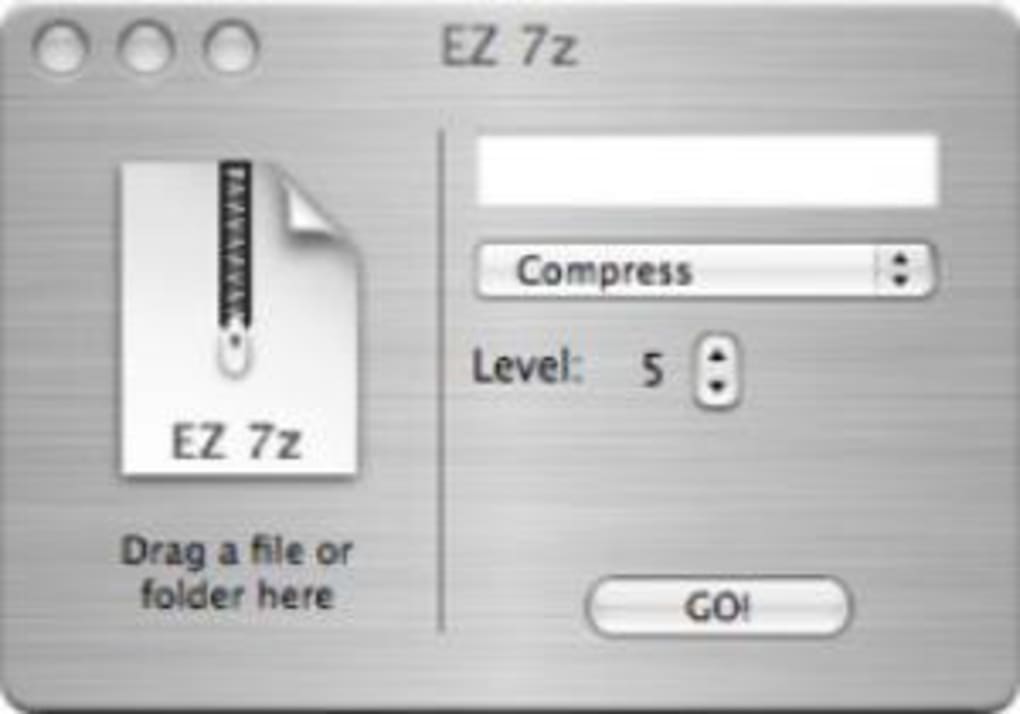
After launching EZ 7z, you’ll see a clean window with two main tabs: “Compress” and “Extract.” To compress files, simply drag them onto the “Compress” area, select your desired format (7z is the default), choose a compression level, and click “Create Archive.” The app will generate a .7z file in the same directory unless you specify an alternate destination.
Extracting Archives Made Easy
Extraction follows the same drag‑and‑drop principle. Drop a .7z file onto the “Extract” pane, pick a destination folder, and press “Extract.” If the archive is password‑protected, EZ 7z will prompt you for the key before proceeding. The progress bar provides real‑time feedback, and you can cancel at any point if needed. The intuitive design means that even users unfamiliar with archive utilities can start compressing or extracting within minutes.
Compatibility, Pros & Cons, and User Feedback
EZ 7z is built for macOS and runs on OS X 10.6 (Snow Leopard) and later versions, including macOS Monterey and Ventura. Its compatibility with older hardware makes it a versatile choice for both legacy systems and the newest Macs.
Pros
- Free and lightweight – no hidden fees or trial periods.
- Fast compression and extraction, especially for 7z archives.
- Secure AES‑256 encryption for password‑protected files.
- Simple drag‑and‑drop interface that integrates with Finder.
- Low memory usage, suitable for older Mac models.
Cons
- Last major update was in 2011; occasional compatibility quirks on the very latest macOS releases.
- Lacks advanced features like multi‑volume split or network extraction.
- No built‑in support for rar archives; users must rely on external tools.
- Interface is functional but not as polished as some commercial alternatives.
EZ 7z delivers exactly what its name promises – a straightforward, reliable way to work with 7z files on a Mac. The pros outweigh the cons for most casual and semi‑professional users. While the software hasn’t seen a major update in over a decade, its core functionality remains solid, and the low system impact is a significant advantage. Users who need more advanced compression options may look elsewhere, but for everyday archiving tasks, EZ 7z is a free, secure, and efficient solution.
Frequently Asked Questions
Is EZ 7z truly free or does it contain hidden costs?
EZ 7z is completely free. There are no trial periods, premium upgrades, or in‑app purchases. You can download, install, and use all features without paying a dime.
Can EZ 7z handle password‑protected archives?
Yes. EZ 7z supports AES‑256 encryption for both creating and extracting password‑protected 7z files. When you open a protected archive, the program prompts you for the password before extraction.
Is EZ 7z compatible with macOS Ventura?
The application runs on macOS Ventura, although it was originally built for OS X 10.6 and later. Most users report stable performance, but occasional UI glitches may appear due to the age of the codebase.
How does EZ 7z compare to the official 7‑Zip for Windows?
While both share the same 7z compression algorithm, EZ 7z focuses on a minimal macOS‑centric UI, whereas 7‑Zip for Windows offers a broader set of utilities, such as command‑line tools and more archive formats. EZ 7z is lighter and easier for Mac users, but it lacks some of the advanced options found in the Windows version.
Can I compress files larger than 4 GB with EZ 7z?
Yes, EZ 7z supports archives larger than 4 GB. However, if you need to split the archive into smaller volumes, you will need a different tool, as EZ 7z does not include multi‑volume splitting.
Conclusion – Should You Download EZ 7z?
If you’re looking for a free, secure, and uncomplicated way to manage 7z archives on a Mac, EZ 7z remains a solid choice. Its lightweight design, strong AES‑256 encryption, and drag‑and‑drop simplicity make it especially appealing for users who value speed over a feature‑heavy interface. While the lack of recent updates and some advanced functionalities may deter power users, the program’s core reliability and zero cost outweigh those concerns for most everyday scenarios. Download EZ 7z today to experience a straightforward compression tool that gets the job done without cluttering your system.







